

Timestamp Types
Timestamps represent points in time. As such, they combine DATE and TIME information.
They can be created using the type name followed by a string formatted according to the ISO 8601 format, YYYY-MM-DD hh:mm:ss[.zzzzzzzzz][+-TT[:tt]], which is also the format we use in this documentation. Decimal places beyond the supported precision are ignored.
Timestamp Types
| Name | Aliases | Description |
|---|---|---|
TIMESTAMP_NS | Naive timestamp with nanosecond precision | |
TIMESTAMP | DATETIME, TIMESTAMP WITHOUT TIME ZONE | Naive timestamp with microsecond precision |
TIMESTAMP_MS | Naive timestamp with millisecond precision | |
TIMESTAMP_S | Naive timestamp with second precision | |
TIMESTAMPTZ | TIMESTAMP WITH TIME ZONE | Time zone aware timestamp with microsecond precision |
TIMESTAMPTZ_NS | Time zone aware timestamp with nanosecond precision |
SELECT TIMESTAMP_NS '1992-09-20 11:30:00.123456789';timestamp_ns ------------------------------- 1992-09-20 11:30:00.123456789
SELECT TIMESTAMP '1992-09-20 11:30:00.123456789';timestamp ---------------------------- 1992-09-20 11:30:00.123456
SELECT TIMESTAMP_MS '1992-09-20 11:30:00.123456789';
SELECT TIMESTAMP_MS '1992-09-20 11:30:00.123456789';
timestamp_ms ------------------------- 1992-09-20 11:30:00.123 timestamp_ms ------------------------- 1992-09-20 11:30:00.123
SELECT TIMESTAMP_S '1992-09-20 11:30:00.123456789';timestamp_s --------------------- 1992-09-20 11:30:00
SELECT TIMESTAMPTZ '1992-09-20 11:30:00.123456789';timestamptz ------------------------------- 1992-09-20 11:30:00.123456+00
SELECT TIMESTAMPTZ '1992-09-20 12:30:00.123456789+01:00';timestamptz ------------------------------- 1992-09-20 11:30:00.123456+00
A TIMESTAMPTZ_NS retains nanosecond precision when rendered as text:
SELECT TIMESTAMPTZ_NS '1992-09-20 11:30:00.123456789';timestamptz_ns ---------------------------------- 1992-09-20 11:30:00.123456789+00
SereneDB distinguishes timestamps WITHOUT TIME ZONE and WITH TIME ZONE (with TIMESTAMP WITH TIME ZONE at microsecond precision and TIMESTAMPTZ_NS at nanosecond precision).
Despite the name, a TIMESTAMP WITH TIME ZONE does not store time zone information. Instead, it only stores the INT64 number of non-leap microseconds since the Unix epoch 1970-01-01 00:00:00+00, and thus unambiguously identifies a point in absolute time, or instant. The reason for the labels time zone aware and WITH TIME ZONE is that timestamp arithmetic, binning, and string formatting for this type are performed in a configured time zone, which defaults to the system time zone and is just UTC+00:00 in the examples above.
The corresponding TIMESTAMP WITHOUT TIME ZONE stores the same INT64, but arithmetic, binning and string formatting follow the straightforward rules of Coordinated Universal Time (UTC) without offsets or time zones. Accordingly, TIMESTAMPs could be interpreted as UTC timestamps, but more commonly they are used to represent local observations of time recorded in an unspecified time zone, and operations on these types can be interpreted as simply manipulating tuple fields following nominal temporal logic.
It is a common data cleaning problem to disambiguate such observations, which may also be stored in raw strings without time zone specification or UTC offsets, into unambiguous TIMESTAMP WITH TIME ZONE instants. One possible solution to this is to append UTC offsets to strings, followed by an explicit cast to TIMESTAMP WITH TIME ZONE. Alternatively, a TIMESTAMP WITHOUT TIME ZONE may be created first and then be combined with a time zone specification to obtain a time zone aware TIMESTAMP WITH TIME ZONE.
Conversion between Strings and Naïve / Time Zone-Aware Timestamps
The conversion between strings without UTC offsets or IANA time zone names and WITHOUT TIME ZONE types is unambiguous and straightforward.
The conversion between strings with UTC offsets or time zone names and WITH TIME ZONE types is also unambiguous.
When strings without UTC offsets or time zone names are converted to a WITH TIME ZONE type, the string is interpreted in the configured time zone.
When strings with UTC offsets are passed to a WITHOUT TIME ZONE type, the offsets or time zone specifications are ignored.
When strings with time zone names other than UTC are passed to a WITHOUT TIME ZONE type, an error is thrown.
Finally, when WITH TIME ZONE and WITHOUT TIME ZONE types are converted to each other via explicit or implicit casts, the translation uses the configured time zone.
To use an alternative time zone, the timezone function may be used:
SELECT timezone('America/Denver', TIMESTAMP '2001-02-16 20:38:40') AS aware1, timezone('America/Denver', TIMESTAMPTZ '2001-02-16 04:38:40') AS naive1, timezone('UTC', TIMESTAMP '2001-02-16 20:38:40+00:00') AS aware2, timezone('UTC', TIMESTAMPTZ '2001-02-16 04:38:40 Europe/Berlin') AS naive2;aware1 | naive1 | aware2 | naive2 ------------------------+---------------------+------------------------+--------------------- 2001-02-17 03:38:40+00 | 2001-02-15 21:38:40 | 2001-02-16 20:38:40+00 | 2001-02-16 03:38:40
Note that TIMESTAMPs are displayed without time zone specification in the results, following ISO 8601 rules for local times, while time-zone aware TIMESTAMPTZs are displayed with the UTC offset of the configured time zone, which is 'Europe/Berlin' in the example. The UTC offsets of 'America/Denver' and 'Europe/Berlin' at all involved instants are -07:00 and +01:00, respectively.
Special Values
Three special strings can be used to create timestamps:
| Input string | Description |
|---|---|
epoch | 1970-01-01 00:00:00[+00] (Unix system time zero) |
infinity | Later than all other timestamps |
-infinity | Earlier than all other timestamps |
The values infinity and -infinity are special cased and are displayed unchanged, whereas the value epoch is simply a notational shorthand that is converted to the corresponding timestamp value when read.
SELECT '-infinity'::TIMESTAMP, 'epoch'::TIMESTAMP, 'infinity'::TIMESTAMP;timestamp | timestamp | timestamp -----------+---------------------+----------- -infinity | 1970-01-01 00:00:00 | infinity
Functions
See Timestamp Functions.
Time Zones
To understand time zones and the WITH TIME ZONE types, it helps to start with two concepts: instants and temporal binning.
Instants
An instant is a point in absolute time, usually given as a count of some time increment from a fixed point in time (called the epoch). This is similar to how positions on the earth's surface are given using latitude and longitude relative to the equator and the Greenwich Meridian. In SereneDB, the fixed point is the Unix epoch 1970-01-01 00:00:00+00:00, and the increment is in seconds, milliseconds, microseconds, or nanoseconds, depending on the specific data type.
Temporal Binning
Binning is a common practice with continuous data: A range of possible values is broken up into contiguous subsets and the binning operation maps actual values to the bin they fall into. Temporal binning is simply applying this practice to instants; for example, by binning instants into years, months and days.
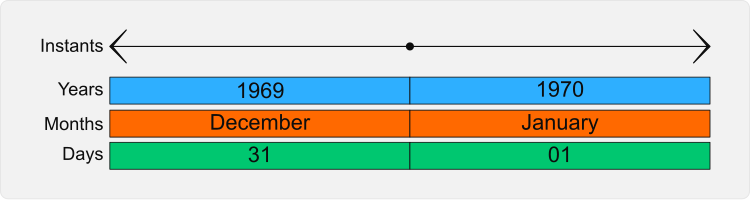
Temporal binning rules are complex, and generally come in two sets: time zones and calendars.
For most tasks, the calendar will just be the widely used Gregorian calendar,
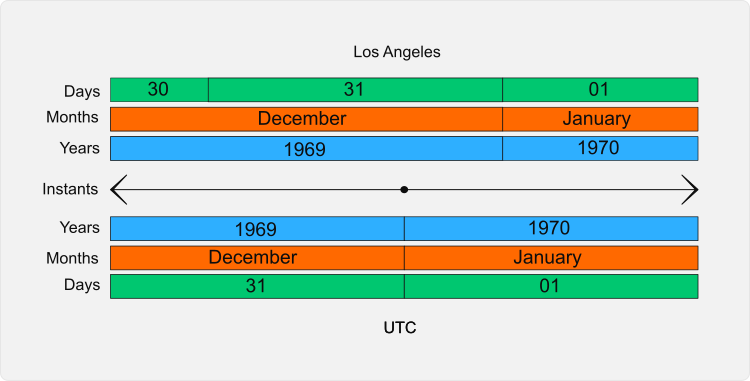
but time zones apply locale-specific rules and can vary widely.
For example, here is what binning for the 'America/Los_Angeles' time zone looks like near the epoch:
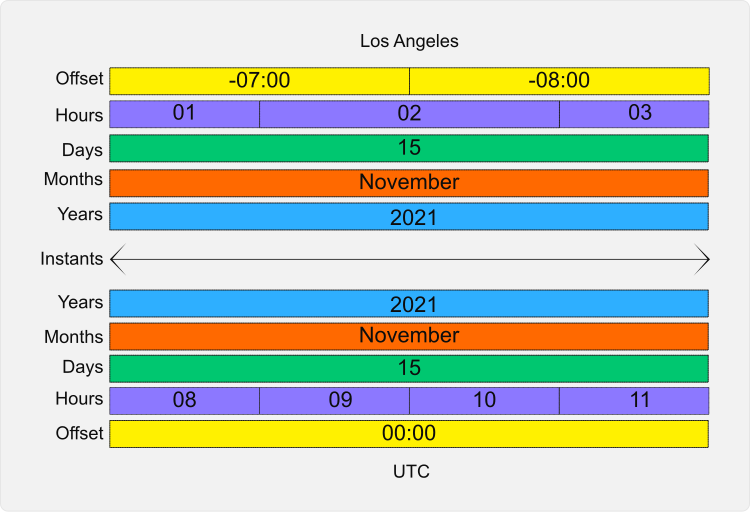
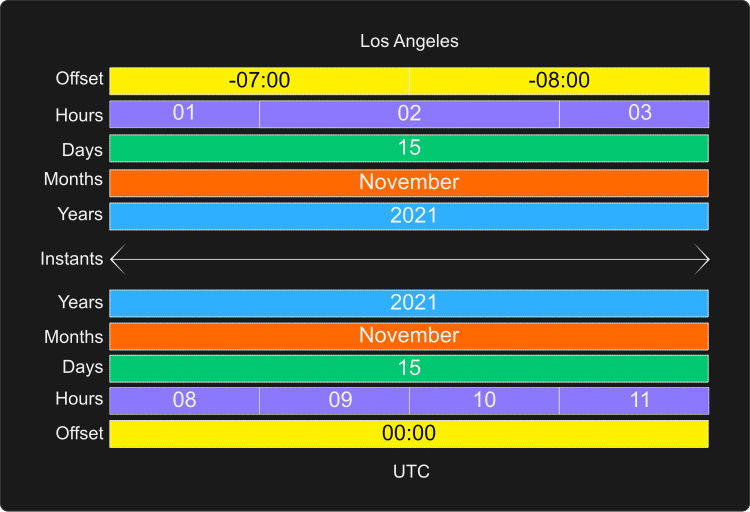
The most common temporal binning problem occurs when daylight saving time changes. The example below contains a daylight saving time change where the "hour" bin is two hours long. To distinguish the two hours, another range of bins containing the offset from UTC is needed:
Time Zone Support
The TIMESTAMPTZ type can be binned into calendar and clock bins. SereneDB implements the binning and arithmetic functions with its own time zone and calendar code, which follows the rules of the International Components for Unicode and carries the IANA time zone database built in.
To set the time zone, use the SET TimeZone command:
SET TimeZone = 'America/Los_Angeles';Time binning operations for TIMESTAMPTZ will then be implemented using the given time zone.
Calendar Support
SereneDB also supports non-Gregorian calendars using the SET Calendar command.
SET Calendar = 'japanese';Time binning operations for TIMESTAMPTZ will then be implemented using the given calendar.
In this example, the era part will now report the Japanese imperial era number.
A list of available calendars can be pulled from the icu_calendar_names() table function:
SELECT nameFROM icu_calendar_names()ORDER BY 1;name --------------------- buddhist chinese coptic dangi ethiopic ethiopic-amete-alem gregorian hebrew indian islamic islamic-civil islamic-rgsa islamic-tbla islamic-umalqura iso8601 japanese persian roc
Settings
When the server starts, TimeZone is the zone the TZ environment variable names, otherwise the zone /etc/localtime points at, otherwise UTC, and Calendar is gregorian.
They can be queried from the sdb_settings() table function:
SELECT *FROM sdb_settings()WHERE name = 'TimeZone';SELECT *FROM sdb_settings()WHERE name = 'Calendar';| name | value | description | input_type |
|---|---|---|---|
| Calendar | gregorian | The current calendar | VARCHAR |
Tip: If you find that your binning operations are not behaving as you expect, check the TimeZone and Calendar values and adjust them if needed.